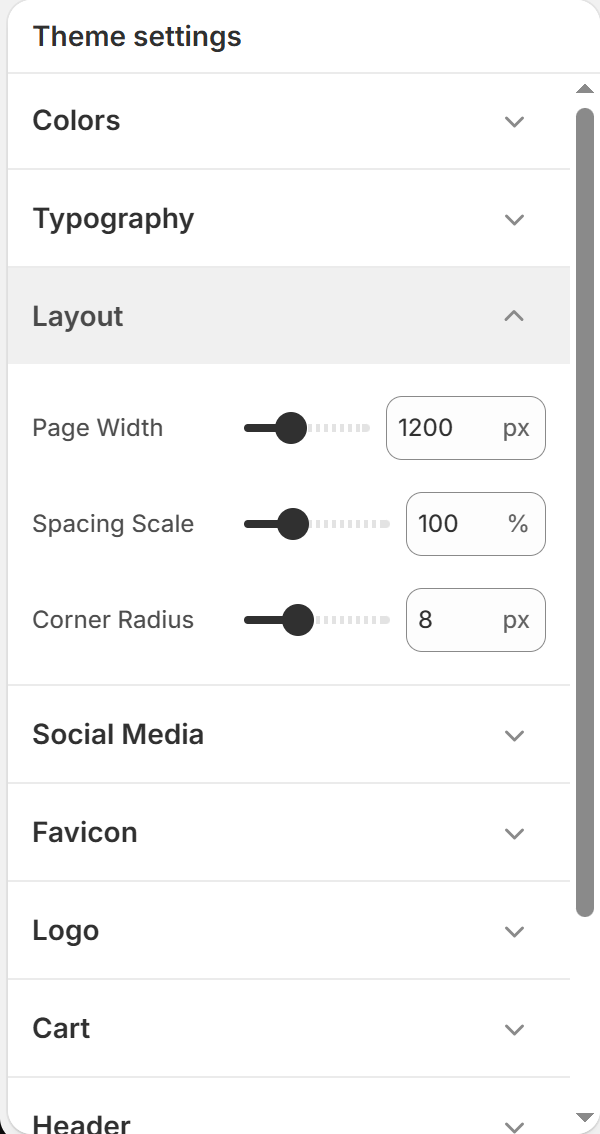
This guide explains how to customize spacing, page container widths, and layout borders across BoltTheme.
Customizing Page Layouts
Access these settings under Theme Settings (Gear Icon) > Layout.
1. Page Width Control
- Range: Adjust the maximum page width from 1000px to 1600px (Default: 1200px).
- Usage:
* A narrower setting (e.g. 1000px) provides a structured, centered look.
* A wider setting (e.g. 1400px–1600px) is ideal for modern, image-heavy stores with large catalog grids.
2. Spacing Scale
- Range: Adjust from 80% to 150% (Default: 100%).
- Usage:
* Adjusts the padding and margins between different homepage sections globally.
* Adjusting this scale helps you control how much white space appears between page elements.
3. Corner Radius
- Range: Adjust from 0px to 24px (Default: 8px).
- Usage:
* Sets the border rounding globally for product cards, buttons, drawers, inputs, and dropdown panels.
* 0px: Sharp, geometric look.
* 8px (Default): Soft, modern rounding.
* 24px: Playful, pill-like rounding for elements.