This guide explains how to customize shopping cart layouts and set up free shipping indicators in BoltTheme.
Customizing Cart Actions
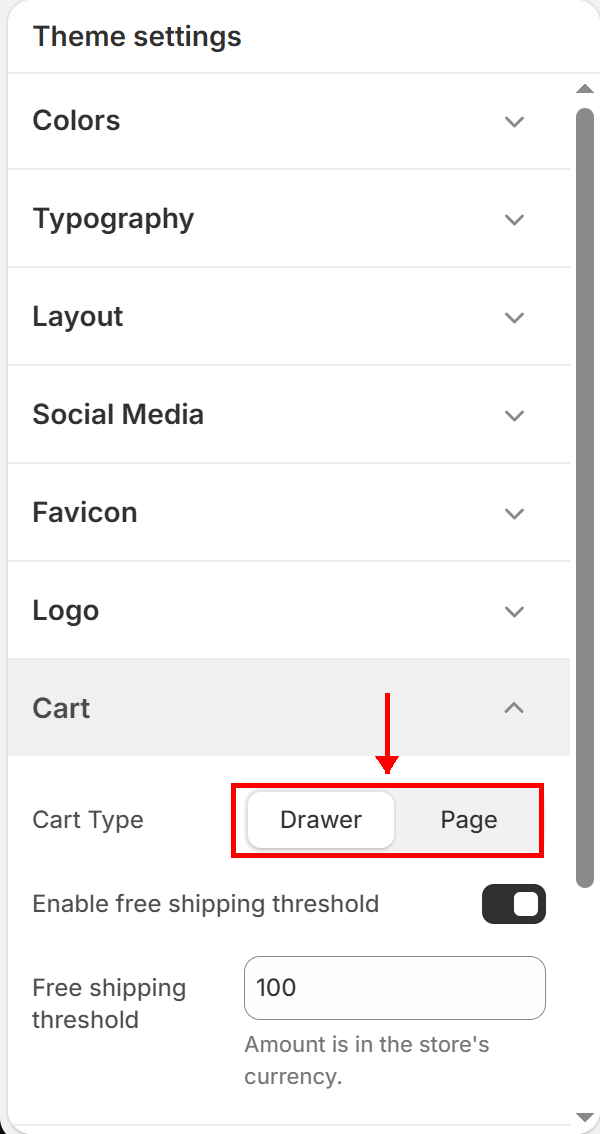
Access these settings under Theme Settings (Gear Icon) > Cart.
1. Cart Type Options
Choose how the shopping cart acts when a customer adds a product:
- Drawer (Recommended):
* Opens a slide-out cart sidebar drawer on the right side of the screen.
* Allows customers to modify quantities or checkout without leaving their current page.
- Page:
* Redirects the user directly to the /cart page after adding an item.
2. Free Shipping Threshold
- Enable Free Shipping Threshold Toggle:
* Displays an animated progress bar inside the Cart Drawer (and on the Cart page) showing how close the customer is to receiving free shipping.
- Free Shipping Threshold Amount:
* Input the value (e.g. 100 for $100 or local equivalent currency values) needed to trigger free delivery.
The theme dynamically calculates the remaining balance (e.g., “Add $20 more for free shipping”*).