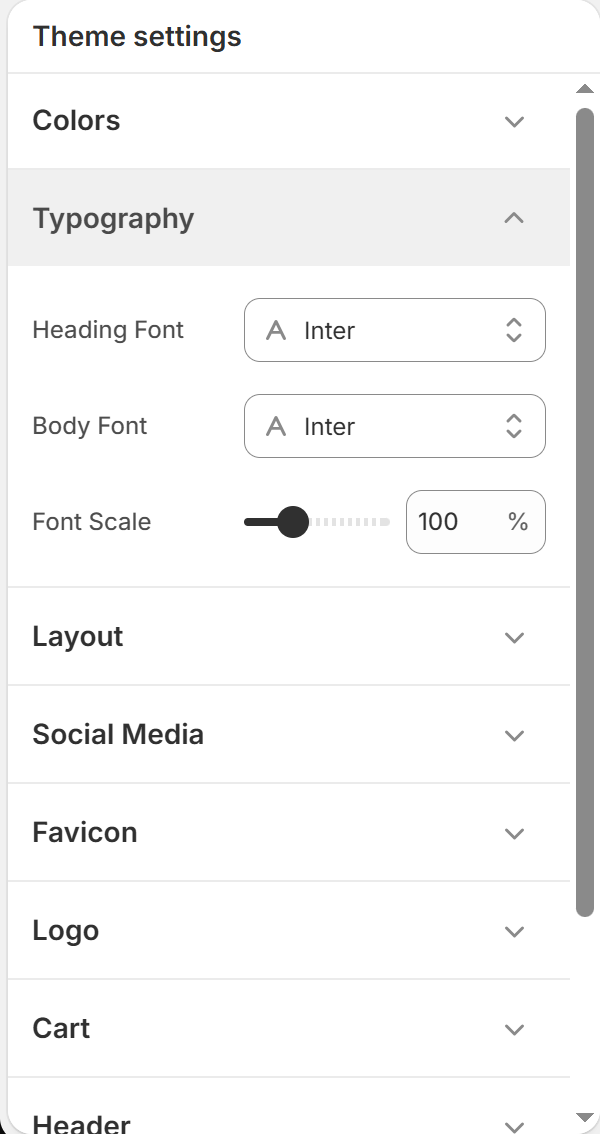
This guide details how to configure typography settings globally across all storefront templates in BoltTheme.
️Customizing Fonts
Navigate to Theme Settings (Gear Icon) > Typography to customize your font settings.
1. Font Family Selectors
- Heading Font (Default: Inter):
* Sets the typography for all title elements (H1–H6), product titles, section headers, and slide titles.
- Body Font (Default: Inter):
* Sets the font for standard paragraph text, variant options, cart text, and blog article bodies.
2. Global Font Scaling
- Font Scale Slider:
* Adjusts the overall text size globally from 80% to 150% (Default: 100%).
* For example, setting the scale to 110% will increase all fonts by 10% dynamically while maintaining correct typographic scale proportions.
Changing the Font Scale is the safest way to adjust text sizing. It updates layouts on both mobile and desktop screens while keeping alignment correct, avoiding layout breaks.